
How to choose a nonprofit WordPress theme

By Shehzad Hussain · Last updated: November 2026
A small food bank I know once lost a donor because its website made giving feel like filing paperwork. The donate button led to a form that asked for an account before it asked for an amount, and the donor gave up halfway through. Nobody on the team had noticed, because nobody had tried to give money through their own site in months. That is the first thing to fix when choosing a nonprofit WordPress theme: walk the donation path yourself, on your phone, before you fall for anything else about the design.
Donation flow is the heart of a nonprofit site, and the theme either supports it or gets in the way. Look for a theme that works cleanly with established donation and fundraising plugins, with space for a clear call to action on every page, not just the homepage. The best themes let you present preset amounts, a custom amount field, and a short line explaining what a gift makes possible, without cluttering the page. Recurring giving should be visible as an option, not hidden three clicks deep, because monthly donors are the ones who keep a nonprofit steady.
Stories first, statistics second
People give to people, not to organizations. A nonprofit theme should make it easy to tell stories: a volunteer profile, a photo from a recent project, a short update from the field. Look for post layouts that put images and quotes to good use, and for a homepage that can feature one current campaign without pushing everything else off the page. If the theme’s demo leans on big numbers and generic slogans, imagine your own stories in those slots. Do they still shine, or does the design swallow them?
Trust is the other half of the story. Donors want to know where money goes, and the theme should give you straightforward places to say so: an annual report page, a plain-language explanation of how funds are used, and visible links to registration or charity status information. A footer that carries contact details and a registered charity number, where applicable, does quiet work on every page. Themes that hide this information behind menus or bury it in tiny text are not helping you.
Built for the team you actually have
Most nonprofits do not have a web team. They have one person who also runs events, writes the newsletter, and answers the phone. The theme has to be maintainable by that person. That means standard WordPress editing, sensible default styles, and no dependency on a dozen premium plugins that all need renewing next year. If the demo only looks good with five extra plugins installed, count the real cost, in money and in upkeep, before committing.
Volunteer recruitment deserves its own thought. A simple, visible route to volunteer — a form, a list of current roles, a page explaining what volunteers actually do — turns visitors into helpers. The same goes for events: a clean events listing, even a simple one, beats a beautiful homepage with no way to find the next fundraiser. And check accessibility early, not as an afterthought. A nonprofit serves the whole community, and a theme with poor contrast, tiny text, or keyboard traps quietly excludes the people you exist to serve.
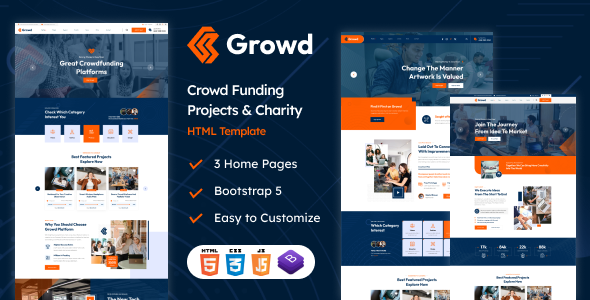
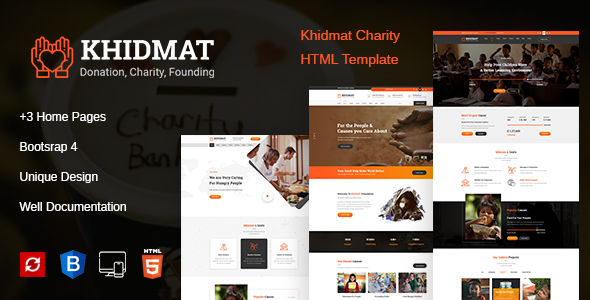
Choose the theme that makes giving easy, stories visible, and upkeep realistic. You can see examples of charity-focused design in products like GROWD, a crowdfunding and charity template and Khidmat, a charity fundraising and donation template, which show how donation and campaign layouts can sit at the center of a site rather than at its edges. Whatever you pick, test it the way a stranger would: arrive, understand the cause in thirty seconds, and give in under two minutes. If that works, the rest is detail.
A launch checklist for a small team
When the new site is nearly ready, run through it the way a stranger would, in this order: arrive at the homepage and understand the cause in under a minute; find a current campaign and understand what a gift achieves; make a small test donation on a phone and confirm the thank-you message is warm and clear; then try to volunteer, find an event, and contact the organisation, each within two clicks. Any step that confuses you will confuse a donor, and it is far cheaper to fix now than after launch. Ask someone outside the organisation to do the same walk-through, because your team already knows where everything is and will not notice what is hidden.
After launch, keep a short monthly routine. Check that donation forms still work after plugin updates, that campaign pages reflect current projects rather than last year’s, and that contact details and opening information are still accurate. Nonprofit sites decay quietly: a campaign ends, a project closes, and the homepage keeps asking for money for it. Assign one person to review the homepage and donation pages on the first working day of each month. Fifteen minutes of upkeep protects the trust that the whole site is built to earn.
- Walk the donation, volunteering, and contact paths as a stranger would.
- Test giving on a phone, including recurring donations and the thank-you step.
- Review campaign pages monthly so closed projects stop asking for money.
- Confirm forms and payment steps still work after every plugin update.
The themes in this post, compared
Every theme below is named in the article itself. The post does not quote prices, so check the product page for the current price.
| Theme | Format | What the post says about it | Price noted in the post |
|---|---|---|---|
| Growd | HTML template | GROWD, a crowdfunding and charity template. | See the product page |
| Khidmat | HTML template | Khidmat, a charity fundraising and donation template, which show how donation and campaign layouts can sit at the center of a site rather than at its edges. | See the product page |
Frequently asked questions
Why does the post emphasise stories first, statistics second for nonprofit WordPress theme?
People give to people, not to organizations. A nonprofit theme should make it easy to tell stories: a volunteer profile, a photo from a recent project, a short update from the field. In practice, that means judging a WordPress theme on this point before you buy, not after the site is built — open the live demo, find the section the post describes, and check it with your own content in place.
What makes Growd a good fit for a nonprofit WordPress theme?
GROWD, a crowdfunding and charity template. That is the post’s own judgement, and it is worth verifying against the live demo: check the Growd demo with your own images and copy, because a theme that looks right with stock content can feel different with yours.
What makes Khidmat a good fit for a nonprofit WordPress theme?
Khidmat, a charity fundraising and donation template, which show how donation and campaign layouts can sit at the center of a site rather than at its edges. That is the post’s own judgement, and it is worth verifying against the live demo: check the Khidmat demo with your own images and copy, because a theme that looks right with stock content can feel different with yours.
How much should I budget for a nonprofit WordPress theme?
The post does not quote a price for nonprofit WordPress theme, so treat the theme as one line in a small budget, not the whole budget. As a guide, WordPress themes on Expert Themes are listed at $20 and HTML templates at $10, with hosting and a domain on top. Check the product page for the current price before you decide, and count any paid plugins you will need.
Will a nonprofit WordPress theme work properly on a phone?
The post treats mobile as a first check rather than an afterthought, and that is the right order: most visitors in this niche arrive on a phone, so open the demo on your own phone and test the menu, the forms, and the main call to action before you buy.
This is general guidance for choosing in this niche, not a guarantee: a theme that scores well on a demo can still slow down once your own images, plugins, and tracking are added. Test any nonprofit WordPress theme with your real content before you commit.
Sources
- WordPress.org — Theme Handbook: theme requirements and review guidelines (accessed November 2026)
- Expert Themes — Growd product page (accessed November 2026)
- Expert Themes — Khidmat product page (accessed November 2026)
- ThemeForest — Expert Themes seller page, member since July 2016 (accessed November 2026)

