Premium product
Globex || IT Solutions & Multi Services HTML5 Template
- Lifetime updates included
- 6 months expert support
- 14-day money-back guarantee
About this product
Buy direct — same theme, instant download.
By Shehzad Hussain · Last updated: November 2026
About Globex
Technology companies often do many things at once, and their websites have to hold all of it together without becoming confusing. Globex is a clean, modern, and responsive HTML5 template that lets you build a website for web design and development, IT entrepreneurs, cyber security and forensics, software development, network solutions, workshops, cloud computing, and IT solution blogs and article sites. That range is its strength: a single template that can present a software firm, a security practice, or a cloud consultancy with equal clarity. The design is fully responsive and tested on all major devices, so clients reading on a phone or a desktop get the same professional impression. Globex is sold by Expert Themes, which has been selling on ThemeForest since July 2016, holds a 4.4 buyer rating on ThemeForest, and counts 8,900+ sales on ThemeForest. Lifetime updates and six months of support are included, and a 14-day money-back guarantee covers the purchase. For IT businesses that need one website to cover a broad set of services, Globex is a flexible and credible option.
Technology companies often do many things at once, and their websites have to hold all of it together without becoming confusing. Globex is a clean, modern and responsive HTML5 template that lets you build a website for web design and development, IT entrepreneurs, cyber security and forensics, software development, network solutions, workshops, cloud computing, and IT solution blogs and article sites. That range is its strength: a single template that can present a software firm, a security practice or a cloud consultancy with equal clarity, without the visitor feeling lost between services.
The design is fully responsive and tested on all major devices, so clients reading on a phone or a desktop get the same professional impression. That matters for a multi-service IT firm, because the visitor may arrive for one service and discover another — a web design client who also needs hosting, or a network client who also needs security. Globex keeps the full range visible and organised, so the breadth of the business reads as capability rather than clutter. For IT businesses that need one website to cover a broad set of services, Globex is a flexible and credible option.
Who should not buy Globex
Globex is not the right buy for a single-service IT firm that wants a focused, narrow site — its whole strength is breadth, and a firm that only does one thing would be paying for structure it does not need. It is also not a client portal, a support-ticket system or a product site: it presents services and content, it does not run client accounts or sell software. A firm that publishes articles daily and needs a CMS would also find static HTML slower than a dashboard.
About this product
Globex is an IT solutions and multi-services HTML5 template for technology companies that do many things at once: web design and development, cyber security and forensics, software development, network solutions, workshops, cloud computing and IT blogs. It is built to hold a broad service range together clearly, with a clean, modern, responsive design tested on all major devices. The template is sold by Expert Themes, a ThemeForest seller July 2016 with a 4.4 buyer rating on ThemeForest and 8,900+ sales on ThemeForest, at $10, reduced from $14. It is static HTML, so it is fast and cheap to host. Lifetime updates, six months of support and a 14-day money-back guarantee are included.
The purchase includes the full template as an instant download, with lifetime updates and six months of support. Support covers installation help, bug fixes and usage guidance, so if a page does not behave as expected or a file is unclear, you can ask rather than guess. A 14-day money-back guarantee covers the purchase, and the template comes from Expert Themes, a ThemeForest seller July 2016 with a 4.4 buyer rating on ThemeForest and 8,900+ sales on ThemeForest behind it.
Highlights
- Covers web design, security, software, networks, workshops and cloud in one template
- Multi-service structure that keeps a broad offer clear instead of cluttered
- Clean, modern, responsive HTML5 design tested on all major devices
- Also suits IT solution blogs and article sites alongside services
- One template that can present a software firm, a security practice or a cloud consultancy
- Lifetime updates and 6 months of support included with a 14-day money-back guarantee
Specifications
| Detail | What you get |
|---|---|
| Pages included | Homepage plus service, blog and contact pages; full list in the live demo |
| Framework | HTML5 with responsive CSS; tested on all major devices |
| Best for | Multi-service IT firms, security practices and cloud consultancies |
| Responsive | Yes — mobile, tablet and desktop |
| Requirements | A modern web browser (Chrome, Firefox, Edge or Safari); any static web hosting — no server software needed; HTTPS recommended |
| Product type | HTML template |
| Updates | Lifetime updates included |
| Support | 6 months included |
| Money-back guarantee | 14 days |
| Seller | Expert Themes — ThemeForest seller July 2016, 4.4 buyer rating on ThemeForest, 8,900+ sales on ThemeForest |
| Version | Not stated on the product page |
Screenshots
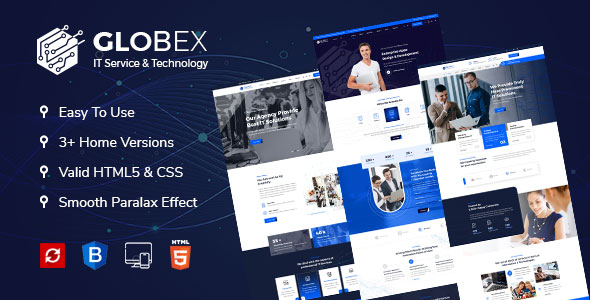
- Homepage hero with multi-service IT overview
- Services grid covering design, security, software and cloud
- Blog or articles section with IT guides
- Contact page with enquiry form
How to use
Organising a multi-service site on Globex
Decide which service leads, give every service the same tidy treatment, then add content.
- Fetch the ZIP. Download the package from your Expert Themes account once you have bought it, then unpack it.
- Decide which service leads. Pick the service bringing in most of your work, software, security, cloud or networks, and put it first.
- Write every service the same way. Give each a short, plain explanation of what it covers and who it is for.
- Add a blog article or two. Duplicate a blog page and publish a guide or company news beside the services.
- Brand it as yours. Put your own logo and photos in place of the demo ones and set your colours in the stylesheet.
- Publish the files. Copy them onto your web host with FTP or the file manager; the template needs no database.
- Walk the site as a new client would. Open the live homepage, scan the service range, and check you can reach the contact step without getting lost.
Limitations
The trade-off in Globex
Globex's strength is breadth, and breadth is also what limits it. A firm that does one thing well, a pure security practice, for example, will find a multi-service structure broader than it needs and would be better served by a focused template. It is not a client platform either: no portal for clients to log in, no support-ticket system and no way to sell software from the site, so it presents services and content and nothing behind them. Articles are manual too; the template suits IT blogs, but each post is a static page built by hand, and a firm publishing daily would want a CMS instead. The range can also become clutter if it is filled carelessly: web design, security, software, networks, workshops and cloud all in one site only reads as capability when each service gets the same tidy treatment.
Frequently asked questions
What services can Globex present in one site?
Web design and development, IT entrepreneurs, cyber security and forensics, software development, network solutions, workshops, cloud computing, and IT solution blogs and article sites. That range is the point: one template that can present a software firm, a security practice or a cloud consultancy with equal clarity.
Is Globex better than a single-service template for a multi-service IT firm?
Yes, if your firm genuinely offers several services. A single-service template forces a broad firm into a narrow structure, while Globex is built to hold the full range together without confusing the visitor. A firm that only does one thing would be better served by a focused template.
Can Globex run a blog alongside the services pages?
Yes. IT solution blogs and article sites are one of the audiences Globex is built for, so you can publish guides and company news beside the services pages. Each article is a static HTML page, so publishing is a manual edit rather than a dashboard post.
How does Globex keep many services from looking cluttered?
By organising them into clear service sections with consistent presentation, so the visitor can scan the range and drill into the one they need. The clean, modern design does the work: the breadth reads as capability rather than clutter when each service gets the same tidy treatment.
Is Globex suitable for a cyber security practice?
Yes. Cyber security and forensics is one of the services Globex is built for, and the same structure suits a security practice presenting its assessments, monitoring and incident response alongside its other services.
Does Globex need WordPress or a database?
No. It is a static HTML5 template with no content management system and no database. You edit the HTML files directly and upload them to any static hosting, which keeps the site fast and means there is nothing server-side to maintain.
Everything you need to build with confidence.
01
Covers web design, security, software, networks, workshops and cloud in one template
02
Multi-service structure that keeps a broad offer clear instead of cluttered
03
Clean, modern, responsive HTML5 design tested on all major devices
04
Also suits IT solution blogs and article sites alongside services
05
One template that can present a software firm, a security practice or a cloud consultancy
06
Lifetime updates and 6 months of support included with a 14-day money-back guarantee
Compatibility & technical information
Product typeHTML Templates
FrameworkHTML5 with responsive CSS; tested on all major devices
Pages includedHomepage plus service, blog and contact pages; full list in the live demo
Best forMulti-service IT firms, security practices and cloud consultancies
ResponsiveYes — mobile, tablet and desktop
RequirementsA modern web browser (Chrome, Firefox, Edge or Safari); any static web hosting — no server software needed; HTTPS recommended
UpdatesLifetime updates included
Support6 months included
Money-back guarantee14 days
SellerExpert Themes — ThemeForest seller July 2016, 4.4 buyer rating on ThemeForest, 8,900+ sales on ThemeForest
VersionNot stated on the product page
Before you install
- A modern web browser (Chrome, Firefox, Edge or Safari)
- any static web hosting — no server software needed
- HTTPS recommended
Related products