Premium product
Eventrox – Conference and Event HTML Template
- Lifetime updates included
- 6 months expert support
- 14-day money-back guarantee
About this product
Buy direct — same theme, instant download.
By Shehzad Hussain · Last updated: November 2026
Exhibitions and congresses are big undertakings, and their websites need to carry a lot of information without feeling overwhelming. Eventrox is a modern HTML template designed for conferences, events, meetups, seminars, exhibitions, congresses, meetings, business conferences, and event management websites, with a fully responsive layout that fits desktops, tablets, iPads, iPhones, and small mobile devices.
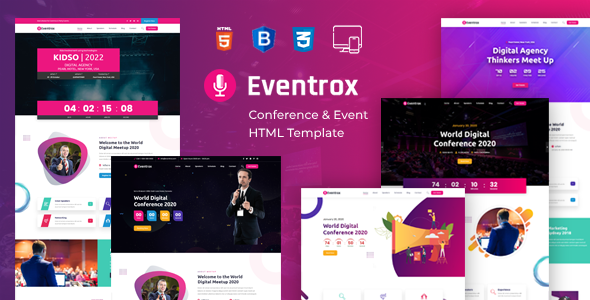
The package is 24 pages, and it is organised around what an attendee actually needs to know. There are five home page variations, an about page, a speakers page with speaker detail pages, a schedule page, an event detail page, a buy-ticket page, a gallery page, a pricing page, an FAQ page, a coming-soon page, an error page, and a full blog set with sidebar, grid and single layouts. The schedule, speakers and ticket pages are the core of an event site, and Eventrox gives each of them a proper page instead of a section squeezed onto the home page.
The front end runs on Bootstrap with jQuery, Owl Carousel, Fancybox, a jQuery countdown for the event timer, and a colour switcher. The countdown is the small feature that does real work: a ticking timer on the home page creates urgency in a way a static date never does.
As a standalone HTML template, Eventrox is a straightforward choice for organisers who want a fast, reliable event site without a content management system behind it: the pages load quickly, the information is easy to find, and the design looks current. That simplicity is an advantage when an event site has to serve thousands of visitors checking dates, venues, and programmes. For event organisers who want a clean, dependable site, Eventrox is a solid pick.
One more thing worth knowing: because Eventrox is static, the site stays fast under load, which matters on the day tickets go on sale or the programme is announced and hundreds of visitors arrive at once. There is no database to slow down and no plugin to update at the worst possible moment.
Eventrox is a 24-page HTML template for conferences, exhibitions, seminars and meetups, from Expert Themes. It is built around the attendee's questions — when, where, who is speaking, what the schedule is and how to get a ticket — and gives each of them a dedicated page.
Five home page variations, a countdown timer, speaker and schedule pages, a gallery and a buy-ticket page come ready to fill in, on a Bootstrap foundation with sliders, lightboxes and a colour switcher. Swap in your event's dates, venue, speakers and programme, and the site is ready to publish.
As a static template it needs only basic hosting — no database, no WordPress. The purchase includes lifetime updates, six months of support and a 14-day money-back guarantee. Eventrox costs $10, reduced from $14.
The dedicated schedule, speakers and ticket pages are the practical difference: attendees get the information they need without hunting, and the countdown timer adds urgency a static date cannot. Everything is yours to keep — no monthly fee and no platform lock-in — and the download is available in your account immediately after purchase.
Highlights
- 24 pages with five home page variations for conferences, exhibitions and seminars
- Dedicated speakers, schedule, event detail and buy-ticket pages — the core of an event site
- Countdown timer that creates urgency as the event date approaches
- Gallery page for photographs from past events
- Blog sidebar, grid and single layouts for event news and announcements
- Lifetime updates, 6 months of support and a 14-day money-back guarantee included
Specifications
| Product type | HTML template (static files, no CMS) |
|---|---|
| Pages included | 24 HTML pages: 5 home pages, about and about-us, speakers and speakers detail, schedule, event detail, buy-ticket, gallery, pricing, FAQs, coming-soon, error-page, blog sidebar, blog grid, blog single and blog pages, services, projects, contact |
| Best for | Conferences, exhibitions, congresses, seminars, meetups, event management |
| Framework | HTML5 and CSS3 on Bootstrap; fully responsive across desktop, tablet and mobile |
| JavaScript libraries | jQuery, jQuery Countdown, Owl Carousel, Fancybox, jQuery UI, WOW.js, colour switcher |
| Requirements | A modern web browser (Chrome, Firefox, Edge or Safari); any static web hosting — no server software needed; HTTPS recommended |
| Support | 6 months of expert support — installation help, bug fixes and usage guidance |
| Updates | Lifetime product updates included |
| Guarantee | 14-day money-back guarantee |
Screenshots
- Homepage hero with event name, dates and countdown timer
- Speakers page with photographs and speaker detail layout
- Schedule page with sessions, times and rooms
- Gallery page with photographs from past events
- Buy-ticket page with ticket tiers and registration route
How to use
- Save the Eventrox download. After buying, sign in to your account and save the Eventrox ZIP to your computer.
- Unzip the 24 pages. Inside are 24 HTML pages plus css, js and images folders.
- Pick the home page for your event. Open the five home files and choose the variation that fits your event's scale and tone.
- Send the files to your hosting. Transfer the folder to public_html in your hosting account — the file manager or an FTP client will do it.
- Enter your event: dates, venue, speakers and schedule. Set the event name, dates and venue, add each speaker with a photograph and bio, and write the schedule with session times.
- Set the countdown and link the ticket page. Update the countdown's target date to your event's start and point the buy-ticket page at your real ticketing provider or registration form.
- Test the ticket route on a phone, then launch. Most attendees check details on a phone, so follow the ticket link yourself, confirm it lands on the right page, then connect your domain.
Limitations
Eventrox announces an event; it does not sell tickets or run one. The buy-ticket page is a front-end design with no payment processing, no registration database and no list of attendees behind it, so real bookings need a ticketing provider or registration form linked in. Speakers and sessions are not managed through any panel: every change is a file edit, and the countdown is a display widget that counts to a date typed into the code. The contact form needs a form service or server script before a message reaches the organiser, and there is no live streaming or virtual event feature. A WordPress edition is not included. For an organiser who wants a dependable site that thousands of visitors can read at once, that simplicity is the point; the selling and the attendee list live in a separate system.
Frequently asked questions
How does the Eventrox countdown timer work?
It is a jQuery countdown widget that counts down to a date you set in the page code. Update the target date to your event's start, and the timer on the home page will count down to it automatically.
Can I sell tickets directly through Eventrox?
No. The buy-ticket page is a front-end page with no payment processing. Link it to your ticketing provider — Eventbrite, a payment page, or your own registration form — to take real bookings.
How many speakers and schedule sessions can Eventrox show?
As many as you add. The speakers page has a speaker detail layout for each person, and the schedule page is a static layout you extend by copying its session blocks for each talk or time slot.
Is Eventrox only for large conferences?
No. It is designed for conferences, events, meetups, seminars, exhibitions and congresses, so a small monthly meetup fits it as well as a multi-day conference — you simply use fewer pages.
How is Eventrox different from Konfer?
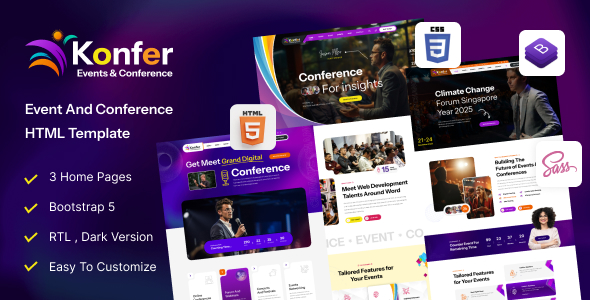
Both cover conferences and events, but Eventrox has five home pages, a dedicated gallery page and three blog layouts, while Konfer has three home pages, a front-end shop and GSAP animation. Eventrox leans on schedule and gallery presentation; Konfer leans on commerce and motion.
Can I reuse Eventrox for next year's event?
Yes. Update the dates, venue, speakers and schedule in the HTML files, reset the countdown target date, and the same template serves the next edition of your event.
Everything you need to build with confidence.
01
24 pages with five home page variations for conferences, exhibitions and seminars
02
Dedicated speakers, schedule, event detail and buy-ticket pages — the core of an event site
03
Countdown timer that creates urgency as the event date approaches
04
Gallery page for photographs from past events
05
Blog sidebar, grid and single layouts for event news and announcements
06
Lifetime updates, 6 months of support and a 14-day money-back guarantee included
Compatibility & technical information
Product typeHTML Templates
FrameworkHTML5 and CSS3 on Bootstrap; fully responsive across desktop, tablet and mobile
Pages included24 HTML pages: 5 home pages, about and about-us, speakers and speakers detail, schedule, event detail, buy-ticket, gallery, pricing, FAQs, coming-soon, error-page, blog sidebar, blog grid, blog single and blog pages, services, projects, contact
Best forConferences, exhibitions, congresses, seminars, meetups, event management
JavaScript librariesjQuery, jQuery Countdown, Owl Carousel, Fancybox, jQuery UI, WOW.js, colour switcher
RequirementsA modern web browser (Chrome, Firefox, Edge or Safari); any static web hosting — no server software needed; HTTPS recommended
Support6 months of expert support — installation help, bug fixes and usage guidance
UpdatesLifetime product updates included
Guarantee14-day money-back guarantee
Before you install
- A modern web browser (Chrome, Firefox, Edge or Safari)
- any static web hosting — no server software needed
- HTTPS recommended
Related products