Premium product
Volia – Conference and Event HTML Template
- Lifetime updates included
- 6 months expert support
- 14-day money-back guarantee
About this product
Buy direct — same theme, instant download.
By Shehzad Khan · Last updated: November 2026
About Volia
Running an event means answering the same questions over and over: when is it, where is it, who is speaking, and how do people register. Volia is built around those answers. It is an HTML template made for conferences, events, meetups, seminars, exhibitions, congresses, meetings, business conferences, and event management sites, so whether you are promoting a single-day seminar or a multi-day congress, the layout is shaped for schedules, speakers, and event details rather than generic business content. The design is modern and fully responsive, fitting desktops, tablets, iPads, iPhones, and small mobile devices, which matters because most attendees check event details on their phones. Because Volia is a standalone HTML template, it stays fast and straightforward to set up, with no content management system standing between you and a live event page. Volia is sold by Expert Themes, a seller on ThemeForest July 2016 whose buyers rate it 4.4, with 8,900+ sales on ThemeForest behind it; lifetime updates and six months of support are included, along with a 14-day money-back guarantee. For organisers who need an event site that looks polished and gets the practical details across quickly, Volia covers the essentials well. Running an event means answering the same questions over and over: when is it, where is it, who is speaking, and how do people register. Volia is built around those answers. It is an HTML template made for conferences, events, meetups, seminars, exhibitions, congresses, meetings, business conferences and event management sites, so whether you are promoting a single-day seminar or a multi-day congress, the layout is shaped for schedules, speakers and event details rather than generic business content. The visitor gets the practical information first, which is what an event site has to do. The design is modern and fully responsive, fitting desktops, tablets, iPads, iPhones and small mobile devices, which matters because most attendees check event details on their phones — the date, the venue, the speaker list, the ticket link. Because Volia is a standalone HTML template, it stays fast and straightforward to set up, with no content management system standing between you and a live event page. For organisers who need an event site that looks polished and gets the practical details across quickly, Volia covers the essentials well.Who should not buy Volia
Volia is not a ticketing platform. It will not sell tickets, manage registrations, or hold attendee lists on its own — those need a ticketing service connected to it. It is also not the right buy for a venue that needs a permanent site with a calendar of many events and a booking system, since the template is shaped around promoting an event rather than running a venue's diary. And an organiser who runs dozens of events a year and needs a CMS to spin up a new event page each time would find static HTML slower than a dashboard.About this product
Volia is a conference and event HTML template for conferences, events, meetups, seminars, exhibitions, congresses, meetings and event management sites. It is built around the questions attendees actually ask — when, where, who is speaking, and how to register — with a modern, fully responsive layout that reads properly on phones, tablets and desktops. The template is sold by Expert Themes, a ThemeForest seller July 2016 with a 4.4 buyer rating on ThemeForest and 8,900+ sales on ThemeForest, at $10, reduced from $14. It is static HTML, so it is fast and cheap to host, and it gets an event page live quickly. Lifetime updates, six months of support and a 14-day money-back guarantee are included. When you buy Volia, you get the complete template package as an instant download: the HTML pages, stylesheets, scripts and images, ready to upload to any static hosting. There is nothing else to buy to get the site live. Every purchase includes lifetime updates, so future improvements to the template are yours at no extra cost, plus six months of support for installation help, bug fixes and usage questions, and a 14-day money-back guarantee if the template does not fit your project.Highlights
- Built for conferences, events, meetups, seminars, exhibitions and congresses
- Layout shaped for schedules, speakers and event details, not generic content
- Fully responsive for desktops, tablets, iPads, iPhones and small mobiles
- Standalone HTML, so an event page goes live fast with no CMS in the way
- Answers the attendee's questions first: when, where, who, how to register
- Lifetime updates and 6 months of support included with a 14-day money-back guarantee
Specifications
| Detail | What you get |
|---|---|
| Pages included | Homepage plus schedule, speaker and contact pages; full list in the live demo |
| Framework | HTML5 with responsive CSS |
| Best for | Conferences, seminars, exhibitions, congresses and meetups |
| Responsive | Yes — desktop, tablet, iPad, iPhone and small mobiles |
| Requirements | A modern web browser (Chrome, Firefox, Edge or Safari); any static web hosting — no server software needed; HTTPS recommended |
| Product type | HTML template |
| Updates | Lifetime updates included |
| Support | 6 months included |
| Money-back guarantee | 14 days |
| Seller | Expert Themes — ThemeForest seller July 2016, 4.4 buyer rating on ThemeForest, 8,900+ sales on ThemeForest |
| Version | Not stated on the product page |
Screenshots
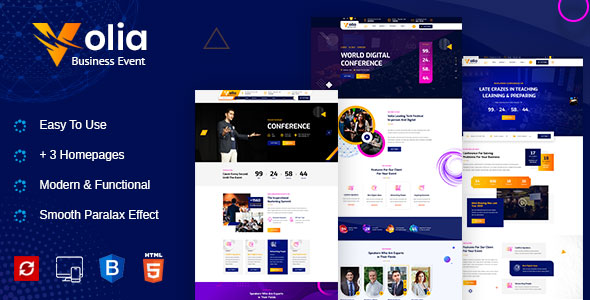
- Homepage hero with event date, venue and registration prompt
- Schedule page with sessions and times
- Speakers page with photos and short bios
- Contact or venue page with location and registration link
How to use
Getting your event live on Volia
An event site has a deadline, so order the work by what attendees need first.- Download and unzip. Save the ZIP from your Expert Themes account and extract the pages.
- Put the date and venue on the homepage. Replace the demo date, venue and city with your own; an attendee should never hunt for when and where.
- Add your speakers. Replace the demo list with your real speakers, a photo and a short bio each, headline names first.
- Fill in the schedule. Write the sessions, times and rooms into the schedule page, and keep it accurate for the day itself.
- Point registration at your ticketing platform. Link the register buttons to the service that sells your tickets, and test the link.
- Upload the files. Transfer everything to your host by FTP or the file manager; no database is required.
- Check it on a phone on the move. Open the live site on a mobile, as an attendee would en route, and confirm date, venue and ticket link read clearly.
Limitations
Volia is not a ticketing platform
Volia answers the four questions every event site must answer, when, where, who is speaking, and how to register, and then it stops. It will not sell a ticket: no payment step, no registration form that stores attendees, and no list of who is coming. Most organisers link the registration button to a ticketing platform and use Volia as the event's home page, which is the honest way to use it. It is also shaped around promoting one event, so a venue that needs a permanent calendar of many events with its own booking system would outgrow it quickly. An organiser running dozens of events a year would feel the same pinch, because each new event page is a set of files edited by hand rather than a new entry in a dashboard.Frequently asked questions
What kinds of events can Volia promote?
Conferences, events, meetups, seminars, exhibitions, congresses, meetings, business conferences and event management sites are all covered. It suits a single-day seminar, a multi-day congress, or a regular meetup series — the layout is shaped for schedules, speakers and event details in each case.Does Volia sell tickets or manage registrations?
No. Volia is a static HTML template that presents the event and directs people to register, but it has no ticketing, payment or attendee management of its own. Most organisers link the registration button to a ticketing platform and use Volia as the event's home page.How should I present the schedule and speakers?
Lead with the practical details: date, venue and the headline speakers, then the full schedule. The template is built so schedules and speaker information sit where attendees look for them, and a speaker list with photos and short bios works well for conferences and congresses.Is Volia suitable for a one-day seminar?
Yes. A single-day seminar can use the same structure with a shorter schedule and a smaller speaker list, and the site will look complete. The template does not assume a multi-day event, so a focused one-day page reads as clean rather than empty.Can I use Volia for a recurring meetup?
Yes. A regular meetup can use Volia as its home page, updating the date, the topic and the speakers for each meeting. Because it is static HTML, each update is an edit and a re-upload, which suits a monthly or quarterly rhythm.Will attendees be able to read event details on their phones?
Yes. The design is fully responsive and fits desktops, tablets, iPads, iPhones and small mobile devices, which matters because most attendees check the date, the venue and the speaker list on their phone, often on the way to the event.Everything you need to build with confidence.
01
Built for conferences, events, meetups, seminars, exhibitions and congresses
02
Layout shaped for schedules, speakers and event details, not generic content
03
Fully responsive for desktops, tablets, iPads, iPhones and small mobiles
04
Standalone HTML, so an event page goes live fast with no CMS in the way
05
Answers the attendee's questions first: when, where, who, how to register
06
Lifetime updates and 6 months of support included with a 14-day money-back guarantee
Compatibility & technical information
Product typeHTML Templates
FrameworkHTML5 with responsive CSS
Pages includedHomepage plus schedule, speaker and contact pages; full list in the live demo
Best forConferences, seminars, exhibitions, congresses and meetups
ResponsiveYes — desktop, tablet, iPad, iPhone and small mobiles
RequirementsA modern web browser (Chrome, Firefox, Edge or Safari); any static web hosting — no server software needed; HTTPS recommended
UpdatesLifetime updates included
Support6 months included
Money-back guarantee14 days
SellerExpert Themes — ThemeForest seller July 2016, 4.4 buyer rating on ThemeForest, 8,900+ sales on ThemeForest
VersionNot stated on the product page
Before you install
- A modern web browser (Chrome, Firefox, Edge or Safari)
- any static web hosting — no server software needed
- HTTPS recommended
Related products