Real estate themes with property search and listings

By Shehzad Hussain · Last updated: November 2026
Picture a buyer at midnight, phone in hand, filtering for three bedrooms within a price range in two neighbourhoods. That person is your real audience, and the search experience you give them is your website. Not your branding, not your homepage slider — the filters, the results, and the listing pages. A real estate theme should be judged almost entirely on how that midnight search feels.
Filters are the first thing to get right, and the details matter more than the number of options. Location search should understand neighbourhood names the way locals use them, not just formal boundaries. Price ranges should reflect your actual market, not generic bands that lump everything together. Bedrooms, bathrooms, property type, and tenure are the basics; beyond that, every extra filter should earn its place by matching a question buyers genuinely ask. Ten filters nobody uses are worse than five that everyone does, because they clutter the interface and slow the search.
Listing cards are your shop window
Search results live or die on the listing card. Each card has one job: make the buyer tap through. That takes a strong primary photo, price stated plainly, beds and baths as figures rather than prose, and location in words people recognise. Cards that hide the price, bury key facts, or show a thumbnail too small to judge the property are costing you enquiries on every search. Test cards on a phone at arm’s length. If you cannot compare three properties at a glance, the design is failing.
Results behaviour matters too. When a buyer applies filters, do results update without losing their place? Does sorting by price or newest actually work? Can they switch between list and map views without the search resetting? Map search deserves a specific test: pins should cluster sensibly in dense areas, and tapping a pin should show enough to decide whether to open the full listing. A map that drops pins on top of each other with no way to separate them is decoration, not a tool.
The listing page closes the deal
Once a buyer opens a property, the page should answer questions in the order they ask them: what does it look like, what does it cost, where exactly is it, what are the key facts, and how do I see it? Photo galleries should be fast and swipeable, with high-resolution images that do not take forever to load. A floor plan, where available, is worth more than another paragraph of description. Key facts — tenure, council tax band, energy rating, where relevant — should be in a scannable facts section, not scattered through prose.
Saved searches and alerts turn one visit into many. A buyer who can save a search and get new matches by email will return without remembering your web address. Check whether the theme supports this natively or through a compatible plugin, and whether the signup is frictionless. Similarly, the enquiry form on a listing page should pre-fill the property reference and ask only for contact details and a message. Every field you add is an enquiry you lose.
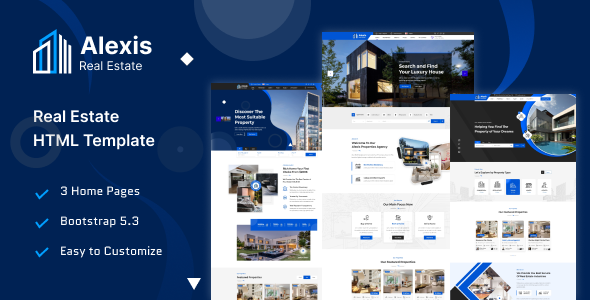
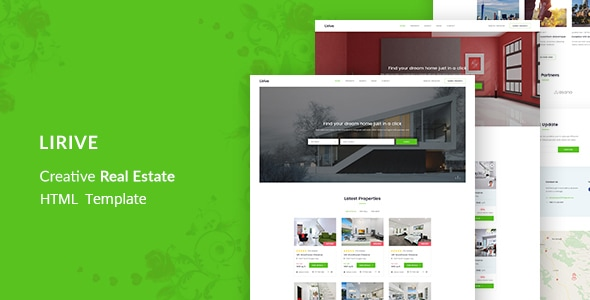
For a sense of how listing-focused layouts work, look at products like ALEXIS, a real estate template, Lirive, a real estate template, and Ourland, a real estate template, which show search, listing cards, and property detail pages arranged around buyer behaviour. Test any theme the way a buyer would: search, filter, compare, open, enquire — all on a phone, all in a few minutes. If that journey is smooth, the theme understands property. If it is not, no amount of polish elsewhere will save it.
The data behind the search is the search
Filters are only as good as the data feeding them. A search that promises three-bedroom houses under a certain price will fail if listings have missing bedroom counts, vague locations, or prices that include some fees and not others. Before judging a theme’s search interface, judge the discipline of the data going into it. Agree on standards for every listing: required fields, photo minimums, location wording, and price presentation. A theme with required-field support or clear listing templates helps enforce those standards, because it makes incomplete listings visible to the person entering them, not just to the buyer who later discovers the gaps.
Photography standards matter just as much. A listing with one dark photo will be skipped no matter how good the filters are, and a listing with twenty unsorted photos will frustrate buyers who cannot find the kitchen. Set expectations: a minimum number of photos, a sensible order starting with the exterior or main living space, and honest images that show the property as it is. The theme should make it easy to order photos and to replace them when a property is redecorated. And keep sold and withdrawn listings out of search results promptly. Nothing erodes trust like falling for a property that sold months ago.
- Agree required fields for every listing: price, beds, location, tenure, photos.
- Set photo standards: minimum count, sensible order, honest images.
- Remove sold and withdrawn listings from search results promptly.
- Review listing quality monthly and coach whoever enters the data.
The themes in this post, compared
Every theme below is named in the article itself. The post does not quote prices, so check the product page for the current price.
| Theme | Format | What the post says about it | Price noted in the post |
|---|---|---|---|
| Alexis | HTML template | For a sense of how listing-focused layouts work, look at products like ALEXIS, a real estate template, Lirive, a real estate template, and Ourland, a real estate template, which show search, listing cards, and property detail pages arranged around buyer. | See the product page |
| Lirive | HTML template | For a sense of how listing-focused layouts work, look at products like ALEXIS, a real estate template, Lirive, a real estate template, and Ourland, a real estate template, which show search, listing cards, and property detail pages arranged around buyer. | See the product page |
| Ourland | HTML template | Ourland, a real estate template, which show search, listing cards, and property detail pages arranged around buyer behaviour. | See the product page |
Frequently asked questions
Why does the post emphasise listing cards are your shop window for real estate themes with property search and listings?
Search results live or die on the listing card. Each card has one job: make the buyer tap through. In practice, that means judging a WordPress theme on this point before you buy, not after the site is built — open the live demo, find the section the post describes, and check it with your own content in place.
What makes Alexis a good fit for a real estate theme with property search and listings?
For a sense of how listing-focused layouts work, look at products like ALEXIS, a real estate template, Lirive, a real estate template, and Ourland, a real estate template, which show search, listing cards, and property detail pages arranged around buyer behaviour. That is the post’s own judgement, and it is worth verifying against the live demo: check the Alexis demo with your own images and copy, because a theme that looks right with stock content can feel different with yours.
What makes Lirive a good fit for a real estate theme with property search and listings?
For a sense of how listing-focused layouts work, look at products like ALEXIS, a real estate template, Lirive, a real estate template, and Ourland, a real estate template, which show search, listing cards, and property detail pages arranged around buyer behaviour. That is the post’s own judgement, and it is worth verifying against the live demo: check the Lirive demo with your own images and copy, because a theme that looks right with stock content can feel different with yours.
How much should I budget for a real estate theme with property search and listings?
The post does not quote a price for real estate themes with property search and listings, so treat the theme as one line in a small budget, not the whole budget. As a guide, WordPress themes on Expert Themes are listed at $20 and HTML templates at $10, with hosting and a domain on top. Check the product page for the current price before you decide, and count any paid plugins you will need.
Will a real estate theme with property search and listings work properly on a phone?
The post treats mobile as a first check rather than an afterthought, and that is the right order: most visitors in this niche arrive on a phone, so open the demo on your own phone and test the menu, the forms, and the main call to action before you buy.
Prices and theme availability change — check the product page before buying. The themes named here were current when the post was written, so test the live demo against your own content before choosing, and confirm the theme is still actively updated.
Sources
- WordPress.org — Theme Handbook: theme requirements and review guidelines (accessed November 2026)
- Expert Themes — Alexis product page (accessed November 2026)
- Expert Themes — Lirive product page (accessed November 2026)
- ThemeForest — Expert Themes seller page, member since July 2016 (accessed November 2026)