Best business WordPress themes for professional company websites

By Shehzad Hussain · Last updated: November 2026
A company website is a salesperson that never sleeps, never takes a holiday, and meets every prospective client before any human does. That is the standard a business WordPress theme has to meet, and it is why the choice matters more than most companies realise. The theme decides how easily the team can keep the site current, how credible the company looks to a first-time visitor, and how well the site turns that visit into an enquiry.
WordPress became the default for company websites for a practical reason: it puts the site in the hands of the people who actually know the business. The marketing manager can publish a news item without emailing a developer. The sales team can update a service description after a client conversation. The owner can change a phone number on a Friday evening. That everyday control is worth more than any single design feature, because a website that is easy to update gets updated, and a website that gets updated stays accurate.
What a professional company site needs
Start with the pages, because they are the same for almost every serious business. A homepage that states what the company does and who it does it for, in the first screen, without making visitors scroll to find out. Service pages that explain each offer in terms of outcomes, not internal process. An about page that gives the company’s story and credentials. And a contact page that offers more than a form: a phone number, an address, and a reason to believe someone will actually reply.
Beyond the pages, a business theme needs to handle trust. Client logos, testimonials, case studies, and any certifications or memberships should have proper places in the design, not be squeezed into a sidebar. Visitors decide whether to trust a company largely on these signals, and a theme that presents them well is doing real sales work.
Why WordPress suits the company website
The plugin ecosystem is the practical reason. Contact forms, appointment booking, search optimisation, security hardening, and backups are all solved problems with mature, well-supported options. A business does not need to commission custom development for any of the standard jobs a company website performs, which keeps both the build cost and the maintenance cost down.
The second reason is longevity. WordPress powers an enormous share of the web, which means finding someone to maintain, extend, or fix a WordPress site is easy, now and in five years. A company website is a long-term asset, and building it on a platform with a deep bench of professionals protects that asset in a way that a bespoke build or an obscure system does not.
Picking a theme that will last
Popularity is a useful signal here, but it is not the whole story. Check when the theme was last updated, because a theme that has not been touched in a year is a risk regardless of how good it looks. Read the support history if it is public. Look at whether the demo content imports cleanly, because a theme that fights you during setup will fight you again every time you build a new page.
Then do the only test that matters: put your own content in it. Write a real service page, add your real team, and use your real contact details. Themes that look generic with your content are generic themes. The right one will make your specific company look established and credible, not like every other business that bought the same demo.
Putting it together
A good business theme is a starting point, not a finished site. Budget time for the content, because the theme cannot supply it: real service descriptions, real client proof, real photography where possible. The companies whose websites win business are rarely the ones with the most elaborate theme. They are the ones whose sites answer the visitor’s questions clearly, load quickly, and make the next step obvious.
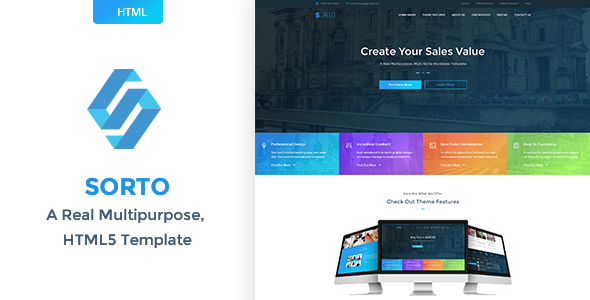
For the theme itself, consultancy and business-focused options are a natural fit. Tallinn is built for business and consultancy firms, with the service and company pages that sector needs, while Sorto takes the multipurpose route for companies that want flexibility across many page types. Either gives a professional firm a site its own team can run, which is the real point of choosing WordPress in the first place.
Maintenance without the headache
WordPress maintenance has a reputation for being fiddly, but for a company website it comes down to three habits. Keep the core, the theme, and the plugins updated, and do it on a schedule rather than when something breaks. Keep automated backups, and occasionally confirm that a backup can actually be restored, because a backup nobody has tested is a hope, not a plan. And limit the plugin count to what the site genuinely uses, since every extra plugin is another thing to update and another potential conflict.
None of this needs to be the owner’s job. A small maintenance arrangement with a developer or an agency covers it for a modest monthly cost, and it is money well spent: the alternative is a company website that slowly goes stale, then breaks at an embarrassing moment. A site that is updated, backed up, and secure is simply a site that can be relied on, and reliability is the whole point of a company website.
The themes in this post, compared
Every theme below is named in the article itself. The post does not quote prices, so check the product page for the current price.
| Theme | Format | What the post says about it | Price noted in the post |
|---|---|---|---|
| Tallinn | WordPress theme | Tallinn is built for business and consultancy firms, with the service and company pages that sector needs, while. | See the product page |
| Sorto | WordPress theme | Sorto takes the multipurpose route for companies that want flexibility across many page types. | See the product page |

Frequently asked questions
Why does the post emphasise what a professional company site needs for business WordPress themes for professional company websites?
Start with the pages, because they are the same for almost every serious business. In practice, that means judging a WordPress theme on this point before you buy, not after the site is built — open the live demo, find the section the post describes, and check it with your own content in place.
What makes Tallinn a good fit for a business WordPress theme for professional company websites?
Tallinn is built for business and consultancy firms, with the service and company pages that sector needs, while. That is the post’s own judgement, and it is worth verifying against the live demo: check the Tallinn demo with your own images and copy, because a theme that looks right with stock content can feel different with yours.
What makes Sorto a good fit for a business WordPress theme for professional company websites?
Sorto takes the multipurpose route for companies that want flexibility across many page types. That is the post’s own judgement, and it is worth verifying against the live demo: check the Sorto demo with your own images and copy, because a theme that looks right with stock content can feel different with yours.
How much should I budget for a business WordPress theme for professional company websites?
The post does not quote a price for business WordPress themes for professional company websites, so treat the theme as one line in a small budget, not the whole budget. As a guide, WordPress themes on Expert Themes are listed at $20 and HTML templates at $10, with hosting and a domain on top. Check the product page for the current price before you decide, and count any paid plugins you will need.
Will a business WordPress theme for professional company websites work properly on a phone?
The post treats mobile as a first check rather than an afterthought, and that is the right order: most visitors in this niche arrive on a phone, so open the demo on your own phone and test the menu, the forms, and the main call to action before you buy.
Prices and theme availability change — check the product page before buying. The themes named here were current when the post was written, so test the live demo against your own content before choosing, and confirm the theme is still actively updated.
Sources
- WordPress.org — Theme Handbook: theme requirements and review guidelines (accessed November 2026)
- Expert Themes — Tallinn product page (accessed November 2026)
- Expert Themes — Sorto product page (accessed November 2026)
- ThemeForest — Expert Themes seller page, member since July 2016 (accessed November 2026)