Corporate WordPress themes for architecture and construction firms

By Shehzad Hussain · Last updated: November 2026
Architecture and construction firms sell work that is visible, permanent and expensive. Their websites should behave accordingly. A visitor deciding whether to trust a firm with a building wants to see completed projects, understand the firm’s range, and find a credible route to a conversation. Too many construction sites fail at the first step by showing small, slow-loading photos in a layout designed for a blog.
The theme choice for these firms is mostly a choice about how projects are shown.
Projects are the homepage
For an architecture or construction firm, the project portfolio is not a section. It is the argument. The theme should offer large, high-quality project imagery, filtering by sector or project type, and project pages with enough room for a proper story: the brief, the constraints, the solution, and the outcome. A grid of thumbnails with no detail tells a visitor that the firm has done work. A project page tells them whether the firm can do their work.
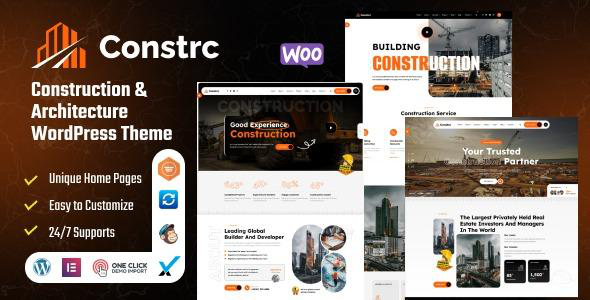
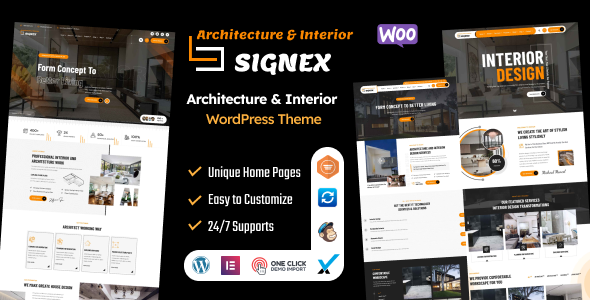
Photography quality matters more here than in almost any other industry. Budget for professional photos of your best projects, and choose a theme that does not compress them into small crops or bury them under text overlays. The construction themes in the catalogue are built for this: Constrc and Builder Expert both centre project galleries and service pages, while Signex leans towards architecture and interior work with a more design-led presentation.
Big images need fast pages
Project photography and fast loading are in tension, and resolving it is part of the theme choice. Look for themes that handle responsive images properly, serving smaller files to phones and full-quality images to desktops, and that support lazy loading so below-the-fold photos do not delay the first screen. Compress images before upload regardless of theme. A portfolio page that takes eight seconds to load will lose visitors who would have hired the firm on the strength of the first photo.
Services and sectors, clearly separated
Construction firms often serve several sectors with different buyers: residential, commercial, public sector. Architecture firms may split between new build, refurbishment and interiors. The site structure should reflect those buyers, with a page per sector that shows relevant projects and speaks to that sector’s concerns. A developer choosing a contractor cares about programme and budget control. A homeowner choosing an architect cares about design process and planning. One generic services page serves neither.
The enquiry route should match the sector too. Large commercial work starts with a formal enquiry or tender invitation, so provide a clear route for that alongside the standard contact form. Residential work often starts with a conversation, so a phone number and a simple form matter more. A theme with flexible call-to-action blocks lets you match the route to the page.
Trust signals specific to building
Certifications, safety records, professional memberships and project values are the trust signals of this industry, and they should appear where buyers look: near project lists and on the about page, not hidden in a footer. The theme should give you clean ways to present these without turning pages into badge collections. A short line about accreditation, placed next to relevant projects, carries more weight than a wall of logos.
Testimonials work similarly. A quote from a developer about delivery on programme is worth more than a generic compliment, and a theme with testimonial layouts that include the project context makes that possible.
Keep the site maintainable on site
Construction and architecture teams are rarely sitting at desks managing websites. WordPress suits these firms because a project update, a news item or a new photo can be added by whoever has the material, without a developer. Choose a theme whose project and page editing is straightforward in the standard editor, and agree a simple routine: new project added when it completes, news updated when something real happens. A portfolio that stops in 2023 quietly tells visitors the firm has stopped too.
Winning work before the tender
By the time a formal tender arrives, the shortlist is often already forming in the buyer’s mind, shaped by reputation, past visibility and informal conversations. A construction or architecture firm’s website should therefore work long before any tender document exists. Project stories, sector pages and news about completed work all build the familiarity that puts a firm on the list. Firms that only appear when a tender is published are competing from behind, however strong their bid.
Visibility here means specifics, not self-promotion. A project page that explains a difficult site constraint and how it was solved tells a buyer more than a claims page ever will. A news item about a completed building, with real photos and a real completion date, does more than a press release full of superlatives. Keep the site current with completed work, and make sure the best projects are easy to find by sector, because buyers search for evidence in their own sector first and judge the firm on what they find there.
The themes in this post, compared
Every theme below is named in the article itself. The post does not quote prices, so check the product page for the current price.
| Theme | Format | What the post says about it | Price noted in the post |
|---|---|---|---|
| Constrc | WordPress theme | The construction themes in the catalogue are built for this: Constrc and Builder Expert both centre project galleries and service pages, while Signex leans towards architecture and interior work with a more design-led presentation. | See the product page |
| Signex | WordPress theme | Signex leans towards architecture and interior work with a more design-led presentation. | See the product page |
| Builder Expert | WordPress theme | Builder Expert both centre project galleries and service pages, while. | See the product page |
Frequently asked questions
Why does the post emphasise projects are the homepage for corporate WordPress themes for architecture and construction firms?
For an architecture or construction firm, the project portfolio is not a section. In practice, that means judging a WordPress theme on this point before you buy, not after the site is built — open the live demo, find the section the post describes, and check it with your own content in place.
What makes Constrc a good fit for a corporate WordPress theme for architecture and construction firms?
The construction themes in the catalogue are built for this: Constrc and Builder Expert both centre project galleries and service pages, while Signex leans towards architecture and interior work with a more design-led presentation. That is the post’s own judgement, and it is worth verifying against the live demo: check the Constrc demo with your own images and copy, because a theme that looks right with stock content can feel different with yours.
What makes Signex a good fit for a corporate WordPress theme for architecture and construction firms?
Signex leans towards architecture and interior work with a more design-led presentation. That is the post’s own judgement, and it is worth verifying against the live demo: check the Signex demo with your own images and copy, because a theme that looks right with stock content can feel different with yours.
How much should I budget for a corporate WordPress theme for architecture and construction firms?
The post does not quote a price for corporate WordPress themes for architecture and construction firms, so treat the theme as one line in a small budget, not the whole budget. As a guide, WordPress themes on Expert Themes are listed at $20 and HTML templates at $10, with hosting and a domain on top. Check the product page for the current price before you decide, and count any paid plugins you will need.
Will a corporate WordPress theme for architecture and construction firms work properly on a phone?
The post treats mobile as a first check rather than an afterthought, and that is the right order: most visitors in this niche arrive on a phone, so open the demo on your own phone and test the menu, the forms, and the main call to action before you buy.
Prices and theme availability change — check the product page before buying. The themes named here were current when the post was written, so test the live demo against your own content before choosing, and confirm the theme is still actively updated.
Sources
- WordPress.org — Theme Handbook: theme requirements and review guidelines (accessed November 2026)
- Expert Themes — Constrc product page (accessed November 2026)
- Expert Themes — Signex product page (accessed November 2026)
- ThemeForest — Expert Themes seller page, member since July 2016 (accessed November 2026)