Best WooCommerce HTML website templates for online stores

By Shehzad Hussain · Last updated: November 2026
Let us start with an honest correction, because it will save you money. WooCommerce is a WordPress plugin. An HTML template cannot run it. If someone sells you an HTML template as a WooCommerce solution, they are selling you a misunderstanding. What an HTML template can give you is the storefront: fast product pages, a beautiful catalogue, and a clear route to buying, paired with a checkout system that lives elsewhere. For some shops, that combination is exactly right. For others, it is a costly detour. Knowing which shop you run is the whole decision.
What an HTML storefront is good for
An HTML storefront excels at presenting products. Pages load instantly, photographs look their best, and the design stays exactly as intended on every device. For a shop with a stable catalogue, a business that takes orders by phone, email, or a simple order form, or a brand that wants a stunning catalogue site while checkout happens on a separate platform, HTML is fast, cheap, and reliable.
It also works well as a landing system for a store that lives elsewhere. A brand can run beautiful product pages in HTML and send buyers to a marketplace, a booking system, or a checkout page to complete the purchase. The customer experience stays smooth as long as the handoff is clear: one obvious button, one destination, no confusion about where the purchase happens.
Where the honest limits sit
The limits are not subtle, and you should face them before building. There is no cart that persists across pages without custom code, no stock management, no automatic tax or shipping calculation, no customer accounts, and no order history. Every product change is a file edit. Every price change is a file edit. A shop with fifty products and monthly changes can manage that. A shop with five hundred products and weekly changes cannot, and should not try.
Payment is the sharpest limit. An HTML page cannot take a card payment by itself. You need a payment link, an order form that leads to manual invoicing, or a separate checkout platform. Each of those works, but each adds a step between desire and purchase, and every added step loses some buyers. Count that cost honestly when you compare against a full store platform.
Product pages that do the selling
Whatever checkout route you choose, the product page carries the sale. A strong HTML product page shows the product clearly with multiple photographs, states the price without ambiguity, explains what the buyer gets in plain language, and offers exactly one next step. Reviews and questions belong on the page too, because they answer objections before the buyer reaches checkout.
Category pages deserve the same care. A shopper browsing a category should be able to scan quickly, compare at a glance, and filter by the attributes that matter for your goods. A category page that is just a grid of images with no prices or names is a gallery, not a shop, and galleries do not take orders.
Pairing HTML with a real checkout
If you go the HTML route, decide the checkout pairing up front. The common patterns are: product pages in HTML with buy buttons that link to a hosted checkout or payment page; an order form that collects the order and triggers manual fulfilment; or a catalogue site that drives enquiries and phone orders. Each pattern suits a different business, and the template should make your chosen pattern obvious rather than hiding it.
Test the full journey in the demo, from product page to completed action, on a phone. If any step feels uncertain, if the buyer would wonder whether the order went through, fix that before launch. Certainty at the moment of purchase is worth more than any design flourish.
Layouts to judge by
Order forms that do not leak sales
When checkout lives outside the HTML pages, the order form becomes the most important page on the site, and it should be designed like one. Ask for only what fulfilment requires: the items, the quantities, a name, and a contact route. Show the total, including delivery, before the customer submits, because a total that appears later feels like a trick. And confirm immediately and clearly, with a message that states what was ordered and what happens next.
Follow up matters just as much. An order that receives no acknowledgement within hours will generate a worried phone call, and a worried customer is a refund risk. Even a simple manual confirmation, sent promptly, keeps the sale safe. Test the whole journey yourself, from product page to confirmation, before you launch, and repeat the test every time you change the form. The journey is the product.
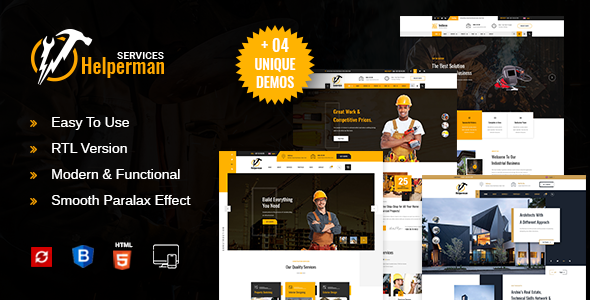
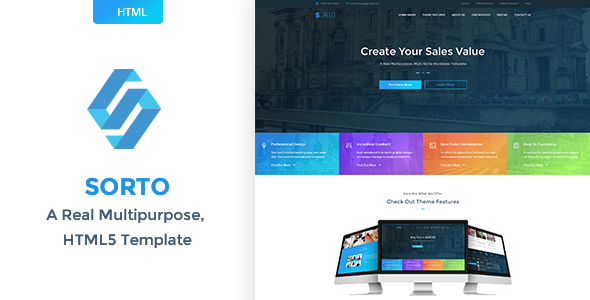
The visual standard for a shop is consistent whatever the stack. The Sorto multipurpose HTML template and the Helperman multipurpose business template show the pattern: products presented cleanly, prices never ambiguous, and a next step always visible. Use them to judge any storefront design, and then ask the harder question: how does a buyer actually pay here? Answer that before you build, and the HTML route can serve you well. Skip it, and you will have a beautiful shop with no till.
The themes in this post, compared
Every theme below is named in the article itself. The post does not quote prices, so check the product page for the current price.
| Theme | Format | What the post says about it | Price noted in the post |
|---|---|---|---|
| Helperman Multipurpose Business | HTML template | Helperman multipurpose business template show the pattern: products presented cleanly, prices never ambiguous, and a next step always visible. | See the product page |
| Helperman | HTML template | Helperman multipurpose business template show the pattern: products presented cleanly, prices never ambiguous, and a next step always visible. | See the product page |
| Sorto Multipurpose | HTML template | Sorto multipurpose HTML template and the. | See the product page |
| Sorto | HTML template | Sorto multipurpose HTML template and the. | See the product page |
Frequently asked questions
Why does the post emphasise what an HTML storefront is good for for WooCommerce HTML website templates for online stores?
An HTML storefront excels at presenting products. Pages load instantly, photographs look their best, and the design stays exactly as intended on every device. In practice, that means judging an HTML template on this point before you buy, not after the site is built — open the live demo, find the section the post describes, and check it with your own content in place.
What makes Helperman Multipurpose Business a good fit for a WooCommerce HTML website template for online stores?
Helperman multipurpose business template show the pattern: products presented cleanly, prices never ambiguous, and a next step always visible. That is the post’s own judgement, and it is worth verifying against the live demo: check the Helperman Multipurpose Business demo with your own images and copy, because a theme that looks right with stock content can feel different with yours.
What makes Helperman a good fit for a WooCommerce HTML website template for online stores?
Helperman multipurpose business template show the pattern: products presented cleanly, prices never ambiguous, and a next step always visible. That is the post’s own judgement, and it is worth verifying against the live demo: check the Helperman demo with your own images and copy, because a theme that looks right with stock content can feel different with yours.
How much should I budget for a WooCommerce HTML website template for online stores?
The post does not quote a price for WooCommerce HTML website templates for online stores, so treat the theme as one line in a small budget, not the whole budget. As a guide, WordPress themes on Expert Themes are listed at $20 and HTML templates at $10, with hosting and a domain on top. Check the product page for the current price before you decide, and count any paid plugins you will need.
Will a WooCommerce HTML website template for online stores work properly on a phone?
The post treats mobile as a first check rather than an afterthought, and that is the right order: most visitors in this niche arrive on a phone, so open the demo on your own phone and test the menu, the forms, and the main call to action before you buy.
Prices and theme availability change — check the product page before buying. The themes named here were current when the post was written, so test the live demo against your own content before choosing, and confirm the theme is still actively updated.
Sources
- MDN Web Docs — HTML: HyperText Markup Language (accessed November 2026)
- Expert Themes — Helperman Multipurpose Business product page (accessed November 2026)
- Expert Themes — Helperman product page (accessed November 2026)
- WooCommerce — official documentation (accessed November 2026)