Best WooCommerce WordPress themes for online stores

By Shehzad Hussain · Last updated: November 2026
Open an online store that works and you will notice something unglamorous: the owner can run it without thinking about the website. Products go in, orders come out, prices change without a developer, and the site keeps working on a busy Saturday. That is the promise of WordPress with WooCommerce, and it is why the combination powers such a large share of independent online stores. The theme you choose should protect that promise, not complicate it.
Start with the daily routine
The most important test of a WooCommerce theme is not the demo homepage. It is the Tuesday routine. Add a product with three variants and a sale price. Mark an item out of stock. Create a coupon for the weekend. Change the homepage banner. If those four tasks are quick and obvious, the theme respects your time. If any of them requires a tutorial, the theme will tax you every week for as long as you use it.
This matters because store owners update constantly. Prices shift, stock moves, seasons change. A theme that makes updates easy gets updated. A theme that makes them painful goes stale, and a stale store loses trust faster than an ugly one.
Product pages that answer before they are asked
A shopper on a product page has a short list of questions: what is it, what does it cost, what are my options, when will it arrive, and what if I need to return it. A good theme answers all five on the page, without sending the shopper hunting. Variant selection should update the price and availability instantly. Delivery estimates should be visible before checkout. Returns information should be one click away, not buried in a policy page.
Photography carries more weight here than any other element. Multiple images, honest angles, and a sense of scale will sell more than any copy. A theme should present images generously and load them fast, because a shopper who cannot see the product clearly will not buy it, however persuasive the description.
Checkout without surprises
The checkout is where stores lose money silently. The rules are simple and often broken: show the full cost early, including shipping and taxes, before the shopper commits. Ask for as little information as possible. Offer guest checkout, because forcing account creation loses buyers who will never return anyway. And if payment fails, say so plainly and let the shopper retry without re-entering everything.
A theme should support those rules rather than fight them. Check the demo checkout on a phone, with a real product in the cart, and count the steps. Then add a shipping rule and a coupon and check again. The theme that keeps checkout short under real conditions is the one to trust.
Coupons, shipping, and the real world
Real stores have awkward cases, and the theme must handle them. Heavy items with different shipping. Products that cannot be shipped to certain regions. Sale items excluded from coupons. Local pickup alongside delivery. Set up those cases in the demo before you commit. A theme that handles the easy cases beautifully and the awkward cases badly will cost you support emails every week.
Reporting belongs in this conversation too. A store owner needs to know what sells, what is running low, and which coupons actually worked. WooCommerce provides that data, and the theme should not obscure it behind a dashboard redesign that prioritises looks over information.
A foundation that covers the whole business
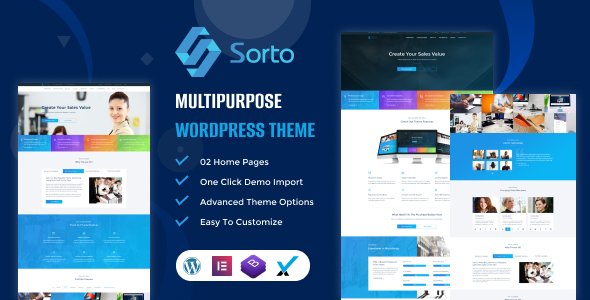
A store’s site is rarely just a shop. It also needs company pages, a contact route, policies, and often a blog or announcements. Multipurpose WordPress themes cover that breadth in one package, which is why they are a sensible starting point. The Sorto multipurpose WordPress theme shows the combination to look for: shop layouts that handle the daily routine alongside business pages, contact routes, and testimonials, so the store feels like a complete business rather than a checkout machine.
Growing from ten products to a thousand
A store that works with ten products can break at a thousand, and the breakage is usually organisational, not technical. Categories that made sense for a small range become confusing at scale. Product names that were clear in a list of ten become ambiguous in a list of hundreds. Attributes, the structured details like size, material, or compatibility, become essential, because they are what make filtering and search work when browsing alone cannot.
Plan for that growth early. Name products consistently, fill in attributes completely, and organise categories around how shoppers think, not how your stockroom is arranged. Bulk editing tools in WooCommerce make large catalogues manageable, but only if the data underneath is consistent. A store that invests in clean product data early will scale smoothly. One that does not will spend its growth years cleaning up instead of selling.
Choose the WooCommerce theme that makes your Tuesday routine effortless, answers the shopper’s five questions on every product page, and keeps checkout free of surprises. That is the theme that will still be earning its keep a year from now.
The themes in this post, compared
Every theme below is named in the article itself. The post does not quote prices, so check the product page for the current price.
| Theme | Format | What the post says about it | Price noted in the post |
|---|---|---|---|
| Sorto Multipurpose | WordPress theme | Sorto multipurpose WordPress theme shows the combination to look for: shop layouts that handle the daily routine alongside business pages, contact routes, and testimonials, so the store feels like a complete business rather than a checkout machine. | See the product page |
| Sorto | WordPress theme | Sorto multipurpose WordPress theme shows the combination to look for: shop layouts that handle the daily routine alongside business pages, contact routes, and testimonials, so the store feels like a complete business rather than a checkout machine. | See the product page |
Frequently asked questions
Why does the post emphasise start with the daily routine for WooCommerce WordPress themes for online stores?
The most important test of a WooCommerce theme is not the demo homepage. In practice, that means judging a WordPress theme on this point before you buy, not after the site is built — open the live demo, find the section the post describes, and check it with your own content in place.
What makes Sorto Multipurpose a good fit for a WooCommerce WordPress theme for online stores?
Sorto multipurpose WordPress theme shows the combination to look for: shop layouts that handle the daily routine alongside business pages, contact routes, and testimonials, so the store feels like a complete business rather than a checkout machine. That is the post’s own judgement, and it is worth verifying against the live demo: check the Sorto Multipurpose demo with your own images and copy, because a theme that looks right with stock content can feel different with yours.
What makes Sorto a good fit for a WooCommerce WordPress theme for online stores?
Sorto multipurpose WordPress theme shows the combination to look for: shop layouts that handle the daily routine alongside business pages, contact routes, and testimonials, so the store feels like a complete business rather than a checkout machine. That is the post’s own judgement, and it is worth verifying against the live demo: check the Sorto demo with your own images and copy, because a theme that looks right with stock content can feel different with yours.
How much should I budget for a WooCommerce WordPress theme for online stores?
The post does not quote a price for WooCommerce WordPress themes for online stores, so treat the theme as one line in a small budget, not the whole budget. As a guide, WordPress themes on Expert Themes are listed at $20 and HTML templates at $10, with hosting and a domain on top. Check the product page for the current price before you decide, and count any paid plugins you will need.
Will a WooCommerce WordPress theme for online stores work properly on a phone?
The post treats mobile as a first check rather than an afterthought, and that is the right order: most visitors in this niche arrive on a phone, so open the demo on your own phone and test the menu, the forms, and the main call to action before you buy.
Prices and theme availability change — check the product page before buying. The themes named here were current when the post was written, so test the live demo against your own content before choosing, and confirm the theme is still actively updated.
Sources
- WordPress.org — Theme Handbook: theme requirements and review guidelines (accessed November 2026)
- Expert Themes — Sorto Multipurpose product page (accessed November 2026)
- Expert Themes — Sorto product page (accessed November 2026)
- WooCommerce — official documentation (accessed November 2026)