Best directory React website templates for online listings

By Shehzad Hussain · Last updated: November 2026
Picture a visitor landing on a city guide at 11 pm, hunting for a late-night pharmacy. She types two letters, taps a neighbourhood filter, and expects the list to narrow before she finishes typing. Nothing reloads. That instant, app-like response is exactly why some directory projects are built with React, and why the template you start from matters more than it first appears.
What makes a directory different from a normal website
A directory is not a brochure with extra pages. It is a database wearing a website’s skin. Every listing carries the same fields — name, category, location, hours, contact details, maybe a rating — and visitors arrive with a question already formed: show me plumbers near me, or cafés open now, or co-working spaces with day passes. The design has to answer that question in seconds, not showcase the designer’s portfolio. Before you compare templates, write down your listing fields and your filters. If a template cannot show those fields cleanly on both the results list and the single listing page, it will fight you for the whole project.
Why React suits search-heavy directories
React shines when a page changes without reloading. In a directory, that means live filtering, sorting by distance or rating, favouriting listings, and map pins that move as the list narrows. A traditional multi-page site can do all of this too, but each filter click becomes a round trip to the server, and the experience feels sluggish on mobile connections. With React, the filtering logic lives in the browser, so results feel immediate. The trade-off is honest: you need a data source. React renders what you feed it, so you still need listings stored somewhere — a headless CMS, a simple API, or even a structured data file for a small directory — and someone comfortable wiring that up. If your directory has a few dozen listings that rarely change, a static site may serve you better and cost less to run.
The parts worth inspecting before you commit
Open any demo and test it the way a real visitor would. Search, filter, then open a listing. Then check these pieces:
- Search behaviour: does it search names only, or also categories, tags, and locations? Can it combine filters, like category plus neighbourhood?
- The single listing page: is there room for photos, a map, opening hours, and a clear contact action without scrolling through clutter?
- Mobile layout: most directory traffic arrives on phones, often while the visitor is out. Thumb-friendly filters and a sticky search bar matter more than desktop flourishes.
- Submission flow: if owners can add or claim listings, is there a form for it, and does the design account for pending or unverified entries?
- Empty states: what does the page show when a search finds nothing? A dead end loses visitors; a helpful suggestion keeps them.
Maps, money, and moderation
Three practical questions decide whether a directory survives past launch. First, maps: does the template include a map view, and how are locations supplied — coordinates per listing, or addresses resolved at runtime? Second, money: many directories earn from featured placements, paid listings, or lead fees. Look for a design that can highlight a featured listing without turning the whole page into an advertisement. Third, moderation: listings go stale. Businesses close, hours change, phone numbers change. Plan who updates listings and how often, because a directory full of dead numbers loses trust faster than a directory with fewer, accurate entries. A template with a clean listing card and a visible ‘report outdated info’ option makes that maintenance easier.
Starting from a listing layout that already works
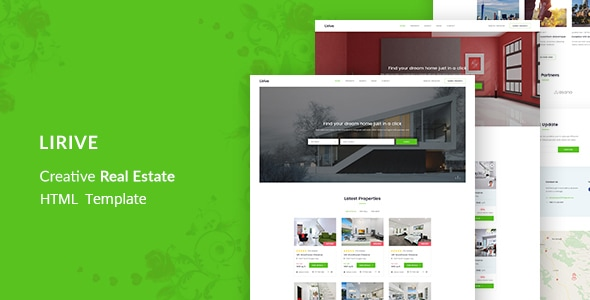
If you are still deciding on structure, studying a listing-style layout helps even when the niche differs. The real-estate template Lirive is built around searchable listings with detail pages, and its card-and-filter arrangement translates well to directory thinking: what fields show on the card, what waits for the detail page, and how a visitor narrows a long list. Borrow the structure, then adapt the fields to your niche.
Where the listings come from, and keeping them fresh
A directory template only renders listings; somebody has to supply them, and that decision shapes the whole project. A small directory can start from a structured data file that a developer edits — simple, cheap, and fine for a few dozen entries that change rarely. A larger one usually needs a headless content system where non-technical editors add and edit listings through a form, or an API fed by another system such as a booking platform. Whichever route you choose, insist on a moderation step: new or edited listings should sit in a queue until someone checks them, because a directory that publishes unchecked entries quickly fills with spam and duplicates. Location data deserves the same care. Decide whether each listing stores coordinates directly or an address that gets resolved when the page loads; coordinates are more reliable for map pins, but they must be captured at entry time or the map will quietly misplace businesses. Finally, plan for decay from day one. A quarterly review pass — emailing listing owners to confirm details, removing entries that bounce — is unglamorous work, and it is what separates directories people trust from directories people abandon after one bad phone number.
Ownership of that maintenance matters as much as the template. If one person holds all the knowledge, the directory stalls when they go on holiday. Document the process in a single page: how to add a listing, how to verify an address, how to handle a removal request, and how featured placement is decided. A React directory built on clean data and a documented routine will outlast a prettier one built on a spreadsheet nobody maintains.
The right React directory template is the one whose search, listing page, and mobile behaviour already match how your visitors ask questions. Get those three right and the rest — colours, fonts, hero images — is easy to change later.
The themes in this post, compared
Every theme below is named in the article itself. The post does not quote prices, so check the product page for the current price.
| Theme | Format | What the post says about it | Price noted in the post |
|---|---|---|---|
| Lirive | HTML template | Lirive is built around searchable listings with detail pages, and its card-and-filter arrangement translates well to directory thinking: what fields show on the card, what waits for the detail page, and how a visitor narrows a long list. | See the product page |
| React | React template | React Templates · 04 Oct, 2026 Best directory React website templates for online listings Picture a visitor landing on a city guide at 11 pm, hunting for a late-night pharmacy. | See the product page |
Frequently asked questions
Why does the post emphasise what makes a directory different from a normal website for directory React website templates for online listings?
A directory is not a brochure with extra pages. It is a database wearing a website’s skin. In practice, that means judging a React template on this point before you buy, not after the site is built — open the live demo, find the section the post describes, and check it with your own content in place.
What makes Lirive a good fit for a directory React website template for online listings?
Lirive is built around searchable listings with detail pages, and its card-and-filter arrangement translates well to directory thinking: what fields show on the card, what waits for the detail page, and how a visitor narrows a long list. That is the post’s own judgement, and it is worth verifying against the live demo: check the Lirive demo with your own images and copy, because a theme that looks right with stock content can feel different with yours.
What makes React a good fit for a directory React website template for online listings?
React Templates · 04 Oct, 2026 Best directory React website templates for online listings Picture a visitor landing on a city guide at 11 pm, hunting for a late-night pharmacy. That is the post’s own judgement, and it is worth verifying against the live demo: check the React demo with your own images and copy, because a theme that looks right with stock content can feel different with yours.
How much should I budget for a directory React website template for online listings?
The post does not quote a price for directory React website templates for online listings, so treat the theme as one line in a small budget, not the whole budget. As a guide, WordPress themes on Expert Themes are listed at $20 and HTML templates at $10, with hosting and a domain on top. Check the product page for the current price before you decide, and count any paid plugins you will need.
Will a directory React website template for online listings work properly on a phone?
The post treats mobile as a first check rather than an afterthought, and that is the right order: most visitors in this niche arrive on a phone, so open the demo on your own phone and test the menu, the forms, and the main call to action before you buy.
Prices and theme availability change — check the product page before buying. The themes named here were current when the post was written, so test the live demo against your own content before choosing, and confirm the theme is still actively updated.
Sources
- React — official documentation, react.dev (accessed November 2026)
- Expert Themes — Lirive product page (accessed November 2026)
- Expert Themes — React product page (accessed November 2026)
- ThemeForest — Expert Themes seller page, member since July 2016 (accessed November 2026)