Premium product
AppLaap | App Landing HTML Template
- Lifetime updates included
- 6 months expert support
- 14-day money-back guarantee
About this product
Buy direct — same theme, instant download.
By Shehzad Hussain · Last updated: November 2026
Launching an app is hard enough without the landing page becoming a project of its own, and AppLaap keeps that part simple. It is a creative app landing page template, built as a clean and responsive HTML5 and CSS3 page on Bootstrap 4, with all files clearly organised and very easy to customise. A developer or founder can adapt it to their app, adjust the content, and get a launch page live without wrestling with the code.
The package is a focused landing site, not a sprawling multi-page build: 10 pages in total, with four home page variations (index.html through index-4.html) plus a blog page, a blog details page, a news single page, an FAQ page, a login page and an error page. That shape fits how app launches actually work. The home page does the selling — what the app does, how it looks, what people say about it, and where to download it — while the blog pages give you somewhere to publish launch news and updates, and the FAQ page answers the questions that would otherwise land in your inbox.
The design is clean rather than flashy, which keeps attention where it belongs: on the app, what it does, and why someone should download it. The front end uses jQuery with Owl Carousel for sliders, Fancybox for lightboxes, WOW.js for scroll animations, and a form validation script, so the interactive parts — screenshots, testimonials, feature tabs — work out of the box. Everything is responsive, so the page looks right on the phone where most app visitors arrive.
AppLaap suits an indie developer, a startup founder or a small team shipping a first version and needing a credible launch page this week. It is not a full marketing site and not an app dashboard; if you need user accounts, a blog with dozens of posts, or a store, you will outgrow it. For a tidy, easy-to-edit landing page that gets out of the way, AppLaap is a practical choice.
AppLaap is a single-purpose HTML landing page template for mobile apps, from Expert Themes. It is built on Bootstrap 4 with clean HTML5 and CSS3, and it is organised so that a founder or developer can change the text, screenshots and colours and launch within a day.
The download includes 10 pages: four home page variations, blog and blog detail pages, a news single page, an FAQ page, a login page and an error page. Sliders, lightboxes and scroll animations are wired in with Owl Carousel, Fancybox and WOW.js, so the page feels alive without extra work.
Because it is static HTML, there is no database and no hosting beyond a basic static plan. The purchase includes lifetime updates, six months of support and a 14-day money-back guarantee. AppLaap costs $10, reduced from $14.
The four home variations are the practical difference: one leads with screenshots, another with features, so you can pick the order that sells your app best. Everything is yours to keep — no monthly fee and no platform lock-in — and the download is available in your account immediately after purchase.
Highlights
- Four home page variations, so you can pick the landing layout that sells your app best
- Built on Bootstrap 4 with clean, clearly organised HTML5 and CSS3 that is easy to customise
- Blog, blog details and news pages included for launch announcements and updates
- FAQ page included to answer download and pricing questions before they reach your inbox
- Owl Carousel sliders, Fancybox lightboxes and WOW.js scroll animations wired in
- Lifetime updates, 6 months of support and a 14-day money-back guarantee included
Specifications
| Product type | HTML template (static files, no CMS) |
|---|---|
| Pages included | 10 HTML pages: index.html, index-2.html, index-3.html, index-4.html, blog.html, blog-details.html, news-single.html, faq.html, login.html, error-page.html |
| Best for | Mobile app launches, indie developers, startups, app showcases |
| Framework | HTML5 and CSS3 on Bootstrap 4; fully responsive |
| JavaScript libraries | jQuery, Owl Carousel, Fancybox, WOW.js, form validation, scroll-to and page navigation scripts |
| Requirements | A modern web browser (Chrome, Firefox, Edge or Safari); any static web hosting — no server software needed; HTTPS recommended |
| Support | 6 months of expert support — installation help, bug fixes and usage guidance |
| Updates | Lifetime product updates included |
| Guarantee | 14-day money-back guarantee |
Screenshots
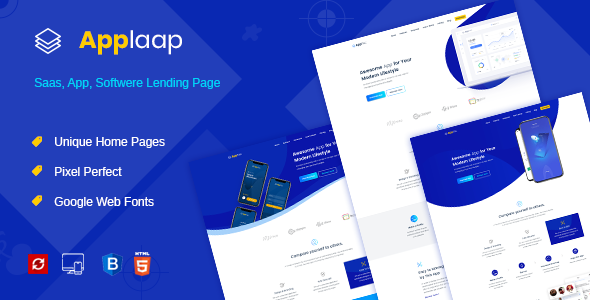
- Homepage hero with app screenshots, tagline and store download buttons
- Features section showing what the app does
- Screenshot carousel with app screens
- Testimonials section with user feedback
- FAQ page answering download and pricing questions
How to use
- Grab the AppLaap files after checkout. Sign in to your account, download the AppLaap ZIP and save it on your computer.
- Extract the ten pages and their folders. You will see 10 HTML pages with css, js and images folders beside them.
- Choose among the four home pages. Open index.html through index-4.html, keep the layout that sells your app best, and rename the winner to index.html if needed.
- Get the folder onto your hosting. Shift the folder into your hosting account's public_html with the file manager or an FTP client.
- Swap in your app's identity. Replace the name, tagline and screenshots with your own, and point the store buttons at your real listings.
- Fill in the pages that support the launch. Write launch news on the blog pages and real answers on the FAQ page, then set brand colours in the stylesheet.
- Test on a phone first, then point your domain at it. Most app visitors arrive on a phone, so check the page there first, then connect your domain.
Limitations
AppLaap is a launch page, not the app and not a platform behind it. The login page is a static design: no accounts, no sign-in and no password reset exist until a backend is connected separately. Download buttons are plain links, so they only work once you paste in your real App Store and Google Play addresses. Blog posts are HTML files edited by hand, there is no built-in way to capture email addresses, and no analytics or payment handling ships with the package. If your launch needs user accounts, a store or a blog with dozens of posts, this single-purpose template will feel small quickly; for a founder who needs a tidy page that sends people to download, it does the one job well.
Frequently asked questions
Which home page version of AppLaap should I use?
There are four: index.html through index-4.html. Open each in a browser, pick the layout whose hero and feature order fits your app best, and use that file as your home page.
Can I link the download buttons to the App Store and Google Play?
Yes. The store buttons are plain links. Replace their href values with your app's real App Store and Google Play URLs and they will send visitors straight to your listings.
Does AppLaap include a working login system?
No. The login page is a static front-end page for design purposes. Real user accounts and sign-in need a backend service connected separately.
How do I add my app's screenshots to AppLaap?
Replace the screenshot image files in the images folder with your own app screenshots, keeping the same file names, or update the image paths in the HTML. The Owl Carousel slider will pick them up automatically.
Is AppLaap built for iOS apps, Android apps, or both?
Both. It is a generic app landing template, so it works for an iPhone app, an Android app or a cross-platform app — the store buttons and screenshots are yours to set.
Can I publish launch news on AppLaap?
Yes. The package includes blog.html, blog-details.html and news-single.html, so you can publish launch announcements and updates as static pages.
Everything you need to build with confidence.
01
Four home page variations, so you can pick the landing layout that sells your app best
02
Built on Bootstrap 4 with clean, clearly organised HTML5 and CSS3 that is easy to customise
03
Blog, blog details and news pages included for launch announcements and updates
04
FAQ page included to answer download and pricing questions before they reach your inbox
05
Owl Carousel sliders, Fancybox lightboxes and WOW.js scroll animations wired in
06
Lifetime updates, 6 months of support and a 14-day money-back guarantee included
Compatibility & technical information
Product typeHTML Templates
FrameworkHTML5 and CSS3 on Bootstrap 4; fully responsive
Pages included10 HTML pages: index.html, index-2.html, index-3.html, index-4.html, blog.html, blog-details.html, news-single.html, faq.html, login.html, error-page.html
Best forMobile app launches, indie developers, startups, app showcases
JavaScript librariesjQuery, Owl Carousel, Fancybox, WOW.js, form validation, scroll-to and page navigation scripts
RequirementsA modern web browser (Chrome, Firefox, Edge or Safari); any static web hosting — no server software needed; HTTPS recommended
Support6 months of expert support — installation help, bug fixes and usage guidance
UpdatesLifetime product updates included
Guarantee14-day money-back guarantee
Before you install
- A modern web browser (Chrome, Firefox, Edge or Safari)
- any static web hosting — no server software needed
- HTTPS recommended
Related products